





arch.ben
משתמש רשום
-
הצטרפות
-
ביקר לאחרונה
-
עבודה על תוכנות תלת מימד כמו: SKETCHUP, REVIT תוכנות רינדור כמו: , LUMION, ENSCAPE תוכנות גרפיות כמו: PHOTOSHOP, INDESIGN עבודה של אדריכל על הרבה תוכנות במקביל, עובד על 2 מסכים כמובן תודה!
-
אשמח למפרט לנייח אבל גם המלצה לנייד, ספציפית מה שהצעת לא מתאים לי אני מחפש מחשב גיימינג ולא דגם יוגה
-
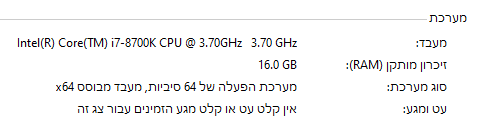
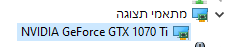
זה חייב להיות נייד חזק ולא נייח, אתה אומר שהתקציב לא מספיק אם ככה אז מה כן התקציב לצרכים? ומה המפרט? היום עובד על פחות מזה במחשב נייח בן 8 שנים ועובד לא רע
-
arch.ben הצטרף לפורומים
-
היי מעוניין לרכוש מחשב נייד לצורך עבודת אדריכל שכוללת תוכנות תלת מימד ורינדור מבוססות מנועי גיימינג כמו LUMION, REVIT למשל. תריץ מספר רב של תוכנות לפעמים כבדות ובמקביל. תקציב - עד 6500 ש"ח אצטרך כרטיס מסך (GeForce RTX 5060) מעבד (AMD Ryzen 7) וזכרון (32GB) חזקים גודל 15.6-18" לכלול מערכת הפעלה קנייה מיידית אשמח לשמוע מה הייתם ממליצים מצרף דוגמה להצעה: מחשב גיימינג לדוגמה האם נראית מתאימה לצרכים וכדאית מבחינת עלות תועלת? תודה רבה לעונים